I’ve bought my fourth pair of headphones today. Not because my old ones broke, but because I was fed up switching back and forth between my FireTV and my smartphone.
And much like the missing absolute volume limit missing in any parental control panel, it’s not a technical issue. It’s simply that nobody is including it in their product even if it seems so very, very obvious.
Now, Bluetooth is a strange protocol with many, many features. Among them is Multipoint audio which is a feature that is meant to solve this exact issue. But like any protocol change it needs to be supported by the devices and as usual, it’s a bit overly complicated.
Multipoint audio lets you connect to two output devices simultaneously and you’ll only hear the dominant one at any gives time.
Thing is, unless you’re at home with a PC and a TV between you want to switch back and forth you’ll rarely have both devices in range and besides… Since the headphones now have to connect to both devices simultaneously, you’re limited by the chipset in use by the headphones. Right now that usually means two devices.
I don’t know about you, but I’ve got a smartphone, a tablet, a PC, a TV, a Steamdeck and about a dozen other devices which I don’t use quite as frequently.
Connecting to two isn’t going to solve anything for me at least.
Besides, I don’t need my headphones to connect to all four. In case of my TV it’s even very much undesirable, because that will turn on the TV.
But, having multiple headphones works beautifully, so why can’t I get have one set of headphones which pretends to be multiple devices? Implementation would be very simple, it would just have to announce a different ID, depending on the profile chosen.
You would pair each outputting device with one profile, possibly name the profiles then switch back and forth via button or any other method available on the headphones (for example voice input, gestures or even a scan method cycling through all profiles, seeing which one gets a connecting within a second or two).
Since today all devices search for known Bluetooth devices continuously, choosing the correct profile would be all it takes to initiate the connection.
If anybody working at Sony (or another headphone manufacturer, but I’ve been a Sony fanboy ever since I got My First Sony) is reading is: You’d make s paying customer very very happy ( /me is waving his wallet ) 😉
Playing House of the Dead 3 on RPCS3 with Switch Controller Gyro
Cross-posted on the RPCS3 forums.
Since RPCS3 got its Move integration I’ve tried getting one game to run perfectly and I thought it would be nice to have all necesarry steps documented necessary to play a Move game with motion controlls on PC.
Note that most Move games are not yet playable on RPCS3 as there is no support for gesture mapping yet and most games require a shake gesture at some point. House of the Dead 3 fortunately doesn’t, which is why we can play it.
![[Image: output.webp]](https://www.tapper-ware.net/files/TutHOTD3/output.webp)
So, let’s start with the Prerequesites
- A Switch-compatible controller (I’m using a 8BitDo SN30 pro+)
- Steam
- RPCS3
- House of the Dead 3
Optionally there are a few components which are not required but improve the experience tremendously
The switch controller is necessary because it can reliably create gyroscope data for Steam which in turn can map it to the mouse, which is what RPCS3 uses as input for Move emulation which it provides for House of the Dead 3 and other move titles.
RPCS3 Shortcut maker allows you to add a direct shortcut to Steam for House of the Dead 3 which means you can create a separate input config for it. So it’s not really required, but if you just add RPCS3 directly to Steam you will have to switch controller profiles manually.
Lossless scaling is a nifty little application which allows you to use a windowed application in virtual fullscreen. Since RPCS3 for now hides the cursor in fullscreen you’ll have to switch out of fullscreen whenever there is no onscreen cursor.
There are also some caveats you should know before you invest any more time:
- Steam overlay is unstable in RPCS3
- Cursor WILL drift requiring regular manual recentering
- Image quality suffers when using Lossless scaling because basically we’re scaling down and up again
So now that you know what you’re getting yourself into, here’s the actual howto:
1. Setting up House of the Dead 3 for mouse control in RPCS3
It’s really surprisingly easy. Create a custom config and set Mouse to NULL, Move to Mouse, Camera to Eye, Handler to Fake and Camera to default on the I/O tab.
![[Image: RPCS31.png]](https://www.tapper-ware.net/files/TutHOTD3/RPCS31.png)
If you want to play in fullscreen via Lossless scaling (which is really the only way if you want a cursor which is often required and which will if you don’t do it through LS require you to constantly switch in and out of fullscreen) also make sure to disable RPCS3 fullscreen:
![[Image: RPCS32.png]](https://www.tapper-ware.net/files/TutHOTD3/RPCS32.png)
Disable Start games in Fullscreen mode here if you do.
2. Adding House of the Dead 3 to Steam
In case you didn’t know, you can add any EXE to Steam:
![[Image: AddToSteam1.png]](https://www.tapper-ware.net/files/TutHOTD3/AddToSteam1.png)
Just browse to RPCS3 exe and add it. If you want a separate profile just for HOTD3 use the shortcut maker to create a separate EXE that will launch HOTD directly and add that instead.
3. Setting up the controller in Steam.
Connect your controller via Bluetooth, then enable Switch controller support through Settings/Controller/General Controller Settings/Switch Pro Configuration Support.
![[Image: SteamController1.png]](https://www.tapper-ware.net/files/TutHOTD3/SteamController1.png)
4. Setting up the controller for House of the Dead 3 specifically
You can set up the controller from the Settings/Manage panel but personally I recommend doing it ingame.
Word of warning: Using the Steam overlay breaks input mapping, so you can’t test your changes right away. The solution is frightfully simple: If after going to the Steam overlay the controller appears broken open the overlay again and exit it immediately. It will work then.
Anyway what you will have to do is map gyro to the mouse as well as the triggers to the mouse:
![[Image: SteamController2.png]](https://www.tapper-ware.net/files/TutHOTD3/SteamController2.png)
Now you best set the settings exactly to what you see in the screenshot. It will give to a good starting point.
Take note of Center Cursor and Pause.
Set Center Cursor to “Move mouse cursor”, click in the middle of the screen and set to “Leave at position”. As I mentioned before the cursor WILL drift, so having a way to recenter is absolutely essential.
You also ocassionally need the start button which in RPCS3 is mapped to LMB+MMB. So make sure to enable Multibutton-mappings for the start button and have it press BOTH buttons.
5. Setting up fullscreen (if you want a cursor)
As I said before RPCS3 fullscreen mode robs you of the cursor which makes sense, but not for Move games. So if you want to play in fullscreen, install Lossless Scaling and set it up for quick input.
![[Image: LS1.png]](https://www.tapper-ware.net/files/TutHOTD3/LS1.png)
I’ve also added the shortcut to enable it to the Steam Controller mapping for HOTD3. You may want to do the same.
6. Enjoy
So now if you launch the game from Steam, it will start directly, but in windowed mode.
Hit the button to enable LS and you’ll be in fullscreen.
Get through the calibration using the now visible cursor.
Play the game.
Regularly use your recenter button to get the cursor back to the middle.
Slightly off-topic, but I really want to say a big thanks to the RPCS3 team. It’s wonderful to be able to enjoy these games in new ways. Awesome, keep up the good work!
Utility to create direct-launch EXE files for RPCS3 PS3 games
Cross posted from the RPCS3 forums.

I’ve written a small utility that may prove useful to other users: It parses the games.yml along with the params.sfo files on your virtual HDD and creates an EXE with the correct name and icon.
rpcs3-stub-generator on GitHub
(The above link will take you straight to the release page where you can download binaries)
The reason it was written was simply that now that I wanted different Steam controller configs for different games (in particular, it’s great to play lightgun games with a gyroscope)… and Steam needs different EXE files for that.
Usage is simple:
Extract, run the GUI application, point it to your RPCS3 folder and the place where you want the EXE files created. If you don’t want it to create stubs for all files select the ones you want in the list, press Generate, done.
If you want to update with your last settings just run the commandline application.
Features:
- Creates EXE files for PS3 games
- Finds disc games added to RPCS3 from games.yml
- Finds installed games by looking through the emulated HDD (SFO parsing included)
- Creates correct icon for each game
- Uses game title for filename
- Includes GUI application for setup and filtering
- Commandline application for automatic creation
Hope it’s useful to others as well.
Building your own GameStreaming cloud
After the last post I realized that few people know how easy it is to turn the PC you already have into a streaming cloud similar to GeforceNow that you can access from anywhere.
So here’s the quick rundown what you need and why:
An Nvidia graphics card with GeforceExperience
Here’s the quick rundown on how and why Nvidia is offering this to users:
Nvidia has a product called the “Shield” which is portable game console which is supposed to Stream your PC games. Shield never really took off, but the Nvidia driver still includes the ability to let the PC be remote controlled by a shield client while streaming audio and video to it. It’s a bit like SteamLink, but at the driver level.
Incidently: If you don’t have an Nvidia graphics card, SteamLink is definitely the best alternative, even if compatibility is a little lower and latency a little higher.
A way to wake your PC
If you don’t want to keep your PC running 24/7, just send it to sleep. You’ll find an option called “WakeOnLan” or “Wake on magic packet” in your BIOS which will allow you to wake it up when you want to play.
WakeOnLAN is actually something fairly simple: it powers down your PC while keeping your network adapter running. It will continue to listen for a special ping containing its MAC address and whenever such a packet is received power up the PC.
A way to connect to your homework
Most routers provide some VPN support. Honestly, it’s usually not worth the trouble. Get yourself a RaspberryPi and set up Wireguard, for example via piVPN. You won’t regret it. There are plenty of guides around.
The VPN built into your router may work, but it may as well delay everything to the point where you’re watching a slideshow.
Problem is… WakeOnLAN won’t work via Wireguard (the details are a little technical, but this is by design).
So what you need to do is ask a device inside your network to wake your PC for you. Many routers have WakeOnLan capabilities, if not you can use a RaspberryPi (again) to act as a proxy.
A way to find your home network from outside
If you have a static IP address then this won’t be an issue, but if you only get a dynamic one (meaning that it changes regulary, usually every 24h), then you’ll need some DNS entry that’s kept up to date. There are plenty of providers for this, just look for “Dynamic DNS” on Google and you should find a good free one.
Keep in mind that dynamic DNS works by YOU updating the DNS entry whenever your IP changes. So if you install the ddns client on your PC and send it to standby, then the entry won’t be updated. So chose something that your router can update (if your router supports any DDNS updates) or set up a RaspberryPi to do it. Don’t install the client on your PC unless you want to keep it running 24/7.
A good internet connection
Well obviously. What’s not so obvious is that a connection that may offer great download speed may still be lousy. What you need is upstream, meaning that you can send OUT a lot of traffic, i.e. the video stream. I use a 32mbit (upstream) cable connection, but usually 16 should be plenty and 8 are usually still enough since the video is highly compressed.
Another issue I’ve briefly had in the past is that my provider tried to downgrade me to DSLite… which is a fancy way of saying that you’ll be able to download anything, but it will be next to impossible to connect to your home network from the outside.
A device to run Moonlight on
Moonlight is an open source client for Nvidia’s shield protocol. It runs on pretty much anything, including Windows, Linux, Android (including FireTV), iOS and a few other platforms.
My setup
So now that you know what you’ll need let’s look into how a setup may actually work, in this case my setup.
- GigaByte Windows 11 PC with Nvidia RTX 2080 to host the session with WakeOnLan enabled.
- Raspberry Pi 3 with Ubuntu 20.10 running piVPN script for Wireguard and wakeonlan to trigger PC wake via SSH
- FritzBox 6591 cable router with port 51820 routed directly to the Raspberry Pi for Wireguard
- 32mbit upstream cable connection with static IP
- Android smartphone, tablet and Windows PCs with Moonlight as client.
- WOL app on my Android smarthphone to execute the wake script on the Pi
Let’s look into it a bit more closely.
The PC
The PC is not exactly the latest and greatest, but it gets the job done (i7-4770k with 32GB RAM). What’s more important is the setup.
Install GeForce Experience and configure it. Well, configuring is a bit of a stretch, you just have to go to settings, click on Shield and move the slider to the right:

What’s a bit more involved is enabling WakeOnLan. You have to restart your PC and enter the BIOS (usually by holding down F2 or ESC). From there the procedure is different almost for every mainboard. In my case I had to go to Advanced and enable Wake on Network.
You may also want to disable Windows requiring a login on Wake if your PC is placed somewhere safe:
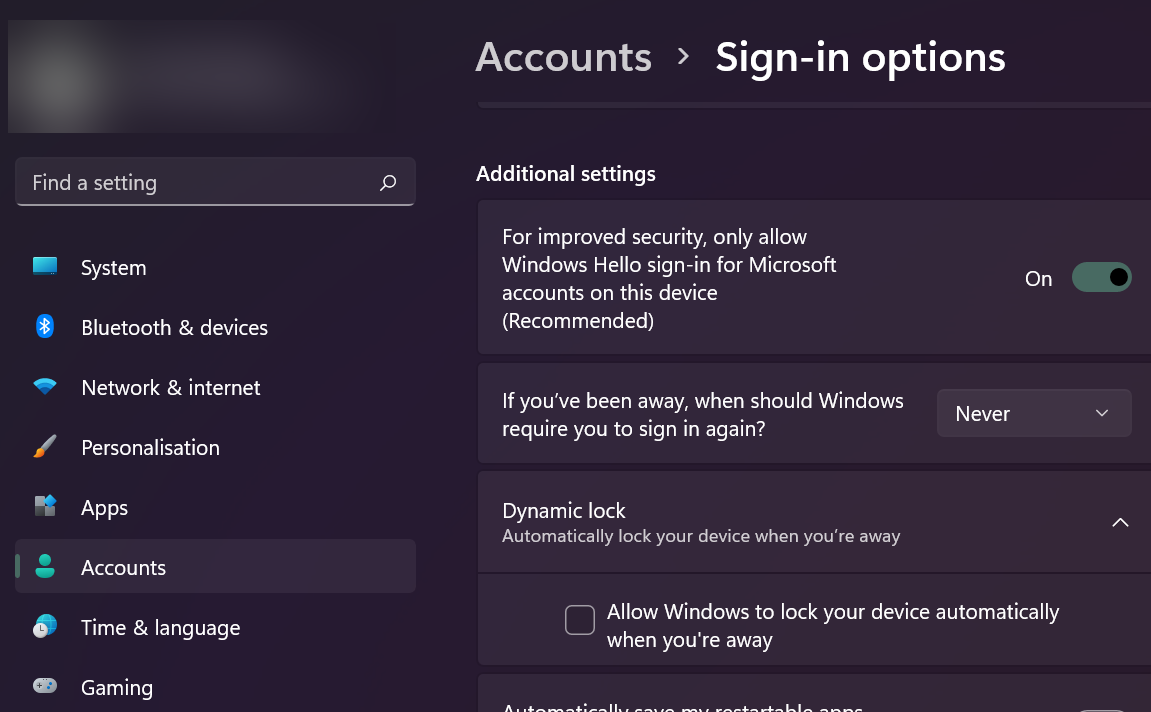
This way it won’t ask you for a password on Wake which may be a pain to enter. But please, only do this if your PC is in a safe location. Unless you’re using a FireTV, Moonlight will let you use a keyboard.
In case you don’t want your screen to turn on once you start streaming, please refer to the previous article.
RaspberryPi
The Raspbbery serves as the main automation hub in my home. I’ve used piVPN to enable WireGuard. It’s really straight forward and there are many guides so I won’t bore you with the details.
If you want to wake your PC using the Pi, don’t forget to install wakeonlan
sudo apt get install wakeonlanRouter
Don’t forget to set up a port forwaring on your Router or you won’t be able to access your WireGuard server:

Client
There are three things you need on the client:
- Wireguard Client
- SSH client to trigger WakeOnLAN on the PI
- Moonlight to play
Also a gamepad usually won’t hurt.
Setting up Wireguard really just boils down to installing the app and scanning the QR code that piVPN generates.
For the SSH client you can use pretty much any client you like. I like WOL simply because you can create a widget-button that will send whatever command you ask silently. For WakeOnLAN this is
wakeonlan -i 192.168.1.23 A0:B1:C2:D3:E4:F5Where 192.168.1.23 is the IP address of your PC and A0:B1:C2:D3:E4:F5 is it’s MAC address.
And that’s pretty much it. Connect the gamepad to your smartphone, connect to your network via Wireguard, wake the PC with WOL and connect via Moonlight.
Gaming Life hacks: Switch to second screen for Screencasting
Honestly every time I head about GeforceNow, Stadia and all the other streaming services I just smile and start Moonlight on my FireTV, my smartphone or any other Android or Windows device I have sitting around. Moonlight has made it so comfortable using your own PC as gaming cloud that it’s almost ridicoulous.
Add Wake-On-Lan, Wireguard and a tiny WOL script on a Raspberry Pi and you don’t even have to keep your PC running. And waking Windows 11 up is a lot faster than any other game service I’ve tried creating a new instance for me.
So, long story short: Live is good if you have a PC and you don’t need no stinking Streaming service.
Sadly, there’s a but. A big one. Well, at least if you have a 32:9 screen like me connected via DisplayPort. Or if you don’t want to keep your screen running every time you stream. Again long story short: If your primary screen isn’t a 1920×1080 screen connected via HDMI you’re going to have issues.
Straightforward solution, add a second screen. The best way I’ve found is simply plugging in an “HDMI Dummy”, you can find plenty of those on Amazon (shouldn’t cost more than $10).
Now, all you need is switch to this device when Streaming starts and you’r set.
Now doing this via the Windows API is slightly complicated, but the good news is that Windows includes a braindead simple app called DisplaySwitch.exe … and detecting active streaming boils down to checking for a process alled “nvstreamer”.
So what it all boils down to is this:
static bool OnSecondScreen=false;
var Switch = Path.Combine(Environment.SystemDirectory, "DisplaySwitch.exe");
var IsStreaming= Process.GetProcesses().Where(a => a.ProcessName.ToLower() == "nvstreamer").Count() > 0;

if(IsStreaming && !OnSecondScreen)
   Process.Start(Switch, "/external");
else if(!IsStreaming && OnSecondScreen)
   Process.Start(Switch, "/internal");

OnSecondScreen = IsStreaming;
Now, there are any number of ways to implement this, (I’ve got a nice little Tray Icon in my taskbar), but all you really need is the good old C# compiler that comes with Windows. Wrapping the code above in a loop you end up with
using System;
using System.IO;
using System.Linq;
using System.Diagnostics;

static class Program{
	static void Main(){
		var OnSecondScreen=false;
		var Switch = Path.Combine(Environment.SystemDirectory, "DisplaySwitch.exe");
		while(true){
			var IsStreaming= Process.GetProcesses().Where(a => a.ProcessName.ToLower() == "nvstreamer").Count() > 0;

			if(IsStreaming && !OnSecondScreen)
			   Process.Start(Switch, "/external");
			else if(!IsStreaming && OnSecondScreen)
			   Process.Start(Switch, "/internal");

			OnSecondScreen = IsStreaming;

			System.Threading.Thread.Sleep(1000);
		}
	}
}
which you can save to a cs file (StreamToSecond.cs in the following example) and compile with the old C# compiler included in Windows (which is outdated, but sufficient for our purposes)
c:\windows\Microsoft.NET\Framework\v4.0.30319\csc.exe /target:winexe StreamToSecond.csPut the EXE into your Startup folder and it will watch for NVStreamer and switch screens accordingly.
Hope it helps someone ^^.
Simple tools are sometimes the most useful
With a kid in the house during the holidays fighting the volume of various devices has become one of my main struggles.
This has actually lead to all kinds of strange tools, but one of the most effective is also one of the simplest. A tiny little C# program which polls the volume of our FireTV and adjusts the volume if it exceeds a certain limit, by default 0.5.
If you’re a parent and comfortable using ADB, you can get the binary and source at https://github.com/hansschmucker/FireTV-VolumeLimiter/releases
I have to be brutally honest here… I’m at a total loss why no OS manufacturer includes this out of the box. We have iOS, macOS, Windows, Android, FireOS and not a single one allows setting the maximum volume level for restricted users.
I love Passbolt
I have to say I’m pretty impressed with Passbolt (a PHP password manager), mainly because it’s so braindead simple. Rather than implement some complex protection scheme on the server, it just transfers the responsibility to the client. The client is the only one who knows the Private Key and if somebody is in a group, then the secret is simply stored encrypted once for every member of the group, with each copy being encrypted with the group member’s public key.
That way whoever copies the data from the server has no way of getting to the private key (maybe by manipulating the web interface, but I’m actually not so sure about that since the web interface actually does the majority of its work through an extension… I’m not sure if the web interface has direct access to the private key).
This offers some interesting possibilities. Namely that you can export the secrets table from the Passbolt MySQL database and it will still be secure as well as readable by each member of a group, because there will be a separate entry for each user.
Decryption is very straight forward since Passbolt itself uses OpenPGP. Just grab a copy, put it in a script and all you have to do is
let privateKeyArmored=document.getElementById("privateKey").value;
let passphrase=document.getElementById("password").value;
let message=document.getElementById("encryptedMessage").value;
let privateKey = await openpgp.decryptKey({privateKey: await openpgp.readKey({ armoredKey: privateKeyArmored }) ,passphrase });
let {data:decrypted} = await openpgp.decrypt({message: await openpgp.readMessage({ armoredMessage:message}),decryptionKeys: privateKey});
document.getElementById("decryptedMessage").value=(decrypted);
And voilà your secret is decrypted. That way you can easily store a safe offline copy that you can decrypt on demand.
Javascript OOP
I thought it would be nice to have yet another person trying to explain how object-oriented programming works in JS, why it looks so different and what the pitfalls and benefits are.
Let’s start of with the basics. A class in any other programming language usually looks something like this
class Foo{
 constructor Foo(){},
 private attribute Type a,
 public attribute Type b,
 private method ReturnType c(){},
 pubic method ReturnType d(){}
}
Coming from a normal object oriented language and having been taught the usual explanation you expect this to provide a kind of contract that the compiler will enforce. If a required type is specified somewhere it will only accept instances of classes descended from this type, you expect it to load the right method based on the signature of the arguments and so on and so forth. On the other hand you don’t really expect the class itself to be accessible by your code. The instances and methods sure, but changing the class at run-time? Impossible.
Well, as usual, Javascript is very different. It’s a lot more powerful since any class can actually be modified on the fly, because there are no real classes. Instead, JS has a concept of constructors and inheritance. Nothing more. Everything else you want you can implement on top of that. You can chose to implement anything you want, but that’s all the language itself provides.
So let’s have a look at constructors work. In other languages, constructors are something optional. In JS, they are the only way to create an instance (aside from a deprecated __proto__ attribute or using [sg]etPrototypeOf in current browsers, but I’d stay away since this could have unintended consequences).
A constructor is just a common function. ANY function can become a constructor, all you have to do is call it with “new”
var x=new (function(){})();
will create an instance of our anonymous constructor.
the only two things that “new” really changes is creating a new object, running the supplied function in the context of this object and if nothing is returned, automatically returning that object.
So why don’t we do
var x=(function(){ return {}; })();
//or better yet
var x={};
//instead of
var x=new (function(){})();
The basic answer is because the special object that is created if you call something with “new” has some very special traits. Specifically, it has its prototype set to the function you used to create it.
So what the heck is a prototype? A prototype is Javascript’s model for inheritance. It’s something like a class, if you access a trait of an object you can access anything that’s provided by the prototype, but it’s a lot more dynamic. That’s because the prototype of an object is itself nothing but an object which you can access and modify at any time.
The logic of Javascript is simple. If you have an object and something tries to access some trait of it, look if the object has it, if not check its constructor’s prototype and access that instead. But since the prototype
itself is nothing but an object, it has a prototype of its own, so you can extend the chain endlessly.
So how do we access the prototype object. Pretty simple. Any function has a prototype attribute, which is a standard object.
So where in any normal programming language we’d declare a method or attribute, in JS we just assign them. We can even change them AFTER we created an instance.
//Define our constructor
var MyConstructor=function(){};
//Create an attribute on it
MyConstructor.prototype.magicNumber=666;

//Create an instance
var myObject=new MyConstructor();
//Output the magicNumber, which at this point is found on the prototype, namely 666
console.log(myObject.magicNumber);
//Change the magicNumber on the prototype
MyConstructor.prototype.magicNumber=42;
//Since the instance still has no own magicNumber attribute, inspecting it will give the changed magicNumber of the prototype: 42
console.log(myObject.magicNumber);
I know what you’re saying: So now we can change a attribute by accessing it in an even more annoying way. Great.
But there’s a method to this madness. And that’s the fact that only reading accesses the prototype chain. Writing on the other hand does not and always modifies the object you’re targeting.
So you can read from the prototype object, but write to the target object, giving you a template mechanism which is not unlike that of a class.
var MyConstructor=function(){};
MyConstructor.prototype.magicNumber=666;
var myObject1=new MyConstructor();
var myObject2=new MyConstructor();
//From Prototype:666
console.log(myObject1.magicNumber);
myObject1.magicNumber=42;
//From myObject1:42
console.log(myObject1.magicNumber);
//Since myObject2 has no magicNumber, from prototype:666
console.log(myObject2.magicNumber);
//Prototype:666
console.log(MyConstructor.prototype.magicNumber);
See, we changed the magicNumber, but it didn’t affect the prototype or any other instances. We haven’t really defined a class and the mechanism is entirely different, but we have an object now that behaves as
if we had classes (modern JS even has a class syntax… I’d stay away, because while it now looks even more like a class in a statically typed programming language, it’s still just an alias to create a prototype,
leading to much unnecessary confusion).
You can check if a attribute resides on the object itself or further up the prototype chain by using hasOwnattribute. toString for example is inherited, so hasOwnattribute returns false, even though we can see it.
var o={"a":"attributeA"};
console.log(o.a);
console.log(o.hasOwnattribute("a"));
console.log(o.toString);
console.log(o.hasOwnattribute("toString"));
So now we know that we can create an object that has a prototype link to another one and that we can use this for attributes. It actually works the same way for functions;
var MyConstructor=function(){};
MyConstructor.prototype.hello=function(){
 console.log("World");
};
var myObject=new MyConstructor();
myObject.hello();
So why do I say functions, not methods? Because methods are a concept that again, doesn’t really exist in Javascript. What we’d usually refer to as method in JS are just function attributes of an object. We can copy them we can overwrite them, we can even move them between objects. That’s because while an execution scope exists in JS, it’s not determined during the creation of the function, but once again at run time.
We can access the current scope of a function using the “this” keyword, the same way we did in the constructor:
var MyConstructor=function(){};
MyConstructor.prototype.magicNumber=666;
MyConstructor.prototype.sayMagicNumber=function(){
 console.log(this.magicNumber);
};
var myObject=new MyConstructor();
myObject.magicNumber=42;
myObject.sayMagicNumber();
Looks an awful lot like a normal method doesn’t it? But we can see it doesn’t work this way if we store a reference to that function and call that instead.
var MyConstructor=function(){};
MyConstructor.prototype.magicNumber=666;
MyConstructor.prototype.sayMagicNumber=function(){
 console.log(this.magicNumber);
};
var myObject=new MyConstructor();
var myFunction=myObject.sayMagicNumber;
myFunction();
Suddenly all it says is “undefined”. Because without being called directly on an object, the function doesn’t know which object it belongs to. The magic happens in the actual “.” or [“”] lookup. Here “this” is set to
the correct object. This is why functions assigned to the prototype don’t return the prototype object as “this”, but the one on which they were called, namely the instance object.
So let’s review for a moment:
1. There are no classes in Javascript
2. However there is a prototype chain which allows access to an objects attribute to bubble up to another object
3. There are no methods
4. But functions are called in the scope of the object to which they are assigned.
5. Everything is dynamic
Understanding these fundamental principles is really all it takes to understand object oriented programming in Javascript. So let’s look at how we can use these principles to emulate even more stuff we are used to
from class-based languages. Inheritance for example. We know that accessing something on an instance looks, if that attribute doesn’t exist, at the prototype. But since the prototype is nothing but an object itself
we can use this to link multiple prototypes to a single instance.
var MyOriginalConstructor=function(){};
MyOriginalConstructor.prototype.a=1;
var MyDerivedConstructor=function(){};
MyDerivedConstructor.prototype=new MyOriginalConstructor();
MyDerivedConstructor.prototype.b=2;
var myInstance=new MyDerivedConstructor();
console.log(myInstance.a+” “+myInstance.b);
See what we did there. We made prototype of MyDerivedConstructor an instance of MyOriginalConstructor. So now every time we access a attribute of the instance it will first look at MyDerivedConstructor’s prototype
and if it can’t find anything it will look further and see if it can find anything on MyOriginalConstructor’s prototype. There is a slight pitfall here. Creating an instance of MyOriginalConstructor may have unintended
side-effects. So what we usually do is create a temporary constructor:
var MyOriginalConstructor=function(){
 console.log("We don't want to run this just for inheritance");
};
MyOriginalConstructor.prototype.a=1;

var MyDerivedConstructor=function(){};

var MyTemporaryConstructor=function(){};
MyTemporaryConstructor.prototype=MyOriginalConstructor.prototype;
MyDerivedConstructor.prototype=new MyTemporaryConstructor();

MyDerivedConstructor.prototype.b=2;

var myInstance=new MyDerivedConstructor();
console.log(myInstance.a+" "+myInstance.b);
However we may want to run the original constructor when the derived constructor is called. We can actually already do this and make sure it runs in the correct scope since we know that all that is used to
determine what “this” refers to is the object on which the function is called. So we can just make the original constructor a attribute of our derived prototype and it will work:
var MyOriginalConstructor=function(){
 this.message="set by MyOriginalConstructor";
};
MyOriginalConstructor.prototype.message="default";

var MyDerivedConstructor=function(){
 this.MyOriginalConstructor();
 console.log(this.message);
};

var MyTemporaryConstructor=function(){};
MyTemporaryConstructor.prototype=MyOriginalConstructor.prototype;
MyDerivedConstructor.prototype=new MyTemporaryConstructor();
MyDerivedConstructor.prototype.MyOriginalConstructor=MyOriginalConstructor;
var myInstance=new MyDerivedConstructor();
You see how just making it a attribute changed everything. There’s also another way that’s often more convinient. We can specify what to set “this” to by using the functions “call” and “apply” in the Function prototype. They are basically the same, just that “call” requires you to specify arguments one by one while apply uses an array:
var myFunction=function(msg1,msg2){console.log(this+" "+msg1+" "+msg2);};
myFunction.call("Hello","Call","Bar");
myFunction.apply("Hello",["Apply","Bar"]);
These are identical as you can see. There’s a third function that’s relatively recent (I won’t explain how to emulate it for now, since this touches an entirely unrelated topic: closures). Bind. Bind gives you
a way to get a proxy function which will always run the original one in the given scope.
var myFunction=function(msg1,msg2){console.log(this+" "+msg1+" "+msg2);};
var myProxy=myFunction.bind("Bound");

myProxy("Arg1","Arg2");
myProxy.call("Hello","Arg1","Arg2");
You see how no matter what we do “this” always points to the string “Bound”. This is something you will have to deal with due to the callback-based nature of Javascript. Often a function, for example addEventListener
only allows you to specify a callback. A callback is just a function reference, so it doesn’t know anymore on which scope to run. Using bind you can make sure it still does.
So, what else can we do? What would we expect to be able to do? An often requested feature is method overloading. Again, Javascript can’t do that, since it doesn’t even have this concept of classes. Everything you create is still of type object, so how would this even work? Again, JS has a concept that doesn’t directly mimic this, but it has something that’s reasonably similar. You can check the prototype chain and see if a function’s prototype is in an object prototype chain. For this, there’s a special operator. The instanceof operator. You may already have encountered this when you were researching how to tell a plain object from any array. Since an array is not a type of its own, here too you have to check the prototype chain.
console.log([] instanceof Array);
So while we cannot overload a function, we can create a proxy function that will run different code based on type and prototype of the arguments:
var MyConstructor=function(){};

var myProxy=function(unknownTypeArg1){
 if(typeof(unknownTypeArg1)=="string")
 console.log("string");
 else if(unknownTypeArg1 && typeof(unknownTypeArg1)=="object" && unknownTypeArg1 instanceof MyConstructor)
 console.log("MyConstructor");
 else
 console.log("other");
}

myProxy("Hello");
myProxy(new MyConstructor());
myProxy(3);
There’s another useful object in JS that can make this even more versatile and that’s the arguments object. Every time you call a function an arguments object is created, containing all the parameters in an Array-like format. Checking this way is a lot more convenient than naming all arguments.
var myProxy=function(){
 if(arguments.length==1 && typeof(arguments[0])=="string")
 console.log("string");
 else if(arguments.length==1 && typeof(arguments[0])=="object" && arguments[0] instanceof MyConstructor)
 console.log("MyConstructor");
 else
 console.log("other");
}

myProxy("Hello");
myProxy(new MyConstructor());
myProxy(3);
And we can even make it dynamic. You should be able to understand most of this, but if you don’t, don’t fret, it is just an example how you can pass the arguments object and analyze it.
Function.checkOverload=function(arrayOfOverloads,args){
 var foundOverload=false;
 for(var i=0;i<arrayOfOverloads.length && !foundOverload;i++){
 if(arrayOfOverloads[i].args.length!=args.length)
 continue;
 var typeMismatch=false;
 for(var j=0;j<arrayOfOverloads[i].args.length && !typeMismatch;j++)
 if(typeof(arrayOfOverloads[i].args[j])=="function"){
 if(arrayOfOverloads[i].args[j]!==null && !(args[j] instanceof arrayOfOverloads[i].args[j]))
 typeMismatch=true;
 }else{
 if(typeof(args[j])!==arrayOfOverloads[i].args[j])
 typeMismatch=true;
 }

 if(!typeMismatch){
 return arrayOfOverloads[i].callback;
 }
 }
 throw new Error("No overload found");
};
Using this function is pretty simple. Just pass in a list of callbacks, each with a signature. checkOverload will return the matching function, so you can execute it with apply (or it will throw an error if there is no match).
var overloadedProxy=function(){
 return Function.checkOverload([
 {
 args:["string"],
 callback:function(s){
 console.log("String "+s);
 }
 },{
 args:[Array],
 callback:function(a){
 console.log("Array "+a);
 }
 },{
 args:["string",Array],
 callback:function(s,a){
 console.log("String "+s+" and Array "+a);
 }
 }
 ],arguments).apply(this,arguments);
};

overloadedProxy("Hello");
overloadedProxy(["World"]);
overloadedProxy("Hello",["World"]);
overloadedProxy(["Hello"],["World"]);
Last but not least, we have the old conundrum of private vs public. The usual way is purely by definition. Private attributes are usually prefixed with “_” by most JS developers. While this doesn’t really change their
accessibility, it gives anybody accessing your code a strong indicator that this field is supposed be private. Most IDEs will even go so far as hide these attributes. There’s also a way to make attributes truly hidden, but
this exploits closures and as such is beyond the scope of this document.
So there you have it. JS is again very different from what most developers are used to, but I hope this article could give you a glimpse at the flexibility that Javascript offers versus the traditional, much less flexible, class model.
Node-SQLite-NoDep : SQLite for node.js without NPM
Seeing as how Mozilla is slowly phasing out anything that’s not part of Firefox (sorry Mozilla, I think that’s the wrong call… we don’t need YACC… yet another Chrome clone), including XUL, XULRunner, JSShell and so on I’m slowly trying to replace these technologies on our servers. JSShell in particular has been invaluable in automating simple tasks in a sane language.
The obvious replacement is node.js… but as great as node.js is, it has a few shortcomings. In particular, it relies heavily on NPM to provide even basic functionality and as any admin knows, something that can break will eventually break if its too complex. An admin wants a solution that’s as complex as necessary, but still as simple as possible. So, installing node.js along with npm on a machine is a liability. Luckily node.js itself is portable, but since its library interface is unstable, depending on anything from npm is a big no-no.
One thing I frequently need is a little database. Simple text files work too, but eventually you’ll end up duplicating what any database already does. SQLite is an obvious choice for applications with very few users, for example reftest results. But connecting SQLite to node.js without anything from NPM is a pretty ugly task. Luckily, there’s also a commandline version of SQLite and while it may not be as fast as a binary interface, it can get the job done… with a little help.
Node-SQLite-NoDep does exactly that. It launches sqlite3.exe and sends any data back and forth between your node.js application and the child_process , converting the INSERT statements produced by sqlite3.exe into buffers and providing basic bind parameter support. The documentation is not entirely complete yet, but you can find a quick introduction here along with the jsdoc documentation available here.
Basically, all you have to do is grab SQLite.js, drop into into a folder, add a bin folder, drop node.exe and sqlite3.exe and you’re good to go.
const SQLite = require('./SQLite.js');

var testdb=new SQLite('.\\mytest.sqlite',[
    {name:"testTable",columns:"X int,LABEL varchar[64],data blob"},
],function(){
    testdb.sql("INSERT INTO ?testTable VALUES(#X,$LABEL,&DATA)",
    {
        testTable:"testTable",
        X:123,
        LABEL:"Hello World",
        DATA:new Buffer("DEADBEEF","hex")
    },
    function(data){
        testdb.sql("SELECT * from ?testTable",
        {
            testTable:"testTable"
        },
        function(data){
            console.log(JSON.stringify(data,null,"\t"));
            process.exit();
        });
    });
});
is really all you need to see it in action. Just put it into test.js file and launch it with
bin\node.exe test.js
to see it in action.
Commandline: Changing resolution
Just had a common issue this morning that would usually require installing an application, but is very easy to solve using the batch file (GIST) from Thursday’s post:
Changing the resolution from a batch file. Specifically, I wanted to lower my display’s resolution whenever I connect via VNC. The first part is simple: Attach a task to the System Event generated by TightVNC Server (Ok, not that easy… this actually involves using Microsoft’s bizarre XPath subset, since TightVNC’s events are not quite as specific as they should be), then set this task to run a batch file.
Now, for some reason, Microsoft doesn’t include anything to do something as simple as setting the resolution by any other means than calling into USER32.DLL directly… and that call is too complex for little old RunDLL32.exe. .NET can’t do it either without calling into USER32.dll. But at least it makes doing so pretty straightforward.
Declare a struct that matches Windows display properties (no need to declare all fields, I just use dummy byte arrays for any fields that I’m not interested in), then call EnumDisplaySettings to retrieve the current settings into that struct. Change the resolution of the retrieved information and pass it back to ChangeDisplaySettings and voilà.
This is also a good example of how to use arguments with C#.CMD. Just don’t. Save them to environment variables instead and retrieve them via System.Environment.GetEnvironmentVariable . SETLOCAL/ENDLOCAL will keep these environment variables from leaking into other parts of your script.
(GIST)
@ECHO OFF
SETLOCAL
SET RES_X=%1
SET RES_Y=%2
echo @^
    using System.Runtime.InteropServices;^
    [StructLayout(LayoutKind.Sequential)]^
    public struct DispSet {^
        [MarshalAs(UnmanagedType.ByValArray,SizeConst=106)]^
            byte[] padding0;^
        public int width, height;^
        [MarshalAs(UnmanagedType.ByValArray,SizeConst=40)]^
            byte[] padding1;^
    };^
    public class App {^
        [DllImport("user32.dll")] public static extern^
        int EnumDisplaySettings(string a, int b, ref DispSet c);^
        [DllImport("user32.dll")] public static extern^
        int ChangeDisplaySettings(ref DispSet a, int b);^
        public static void Main() {^
            var disp = new DispSet();^
            if ( EnumDisplaySettings(null, -1, ref disp) == 0)^
                return;^
            disp.width=int.Parse(System.Environment^
                .GetEnvironmentVariable("RES_X"));^
            disp.height=int.Parse(System.Environment.^
                GetEnvironmentVariable("RES_Y"));^
            ChangeDisplaySettings(ref disp, 1);^
        }^
    }^
 |c#
ENDLOCAL
Assuming you have C#.CMD somewhere in your path, you can now simply call this batch file with horizontal resolution as first argument and vertical as second.